
SMILEINSPO · CONSULTATION VISUALIZATION
AI smile simulator for dentists.
SmileInspo is an AI Dental Smile Simulator & Digital Smile Design Studio. Start with a patient photo, explore an illustrative after smile, then bring the selected preview into motion with a short talking video.
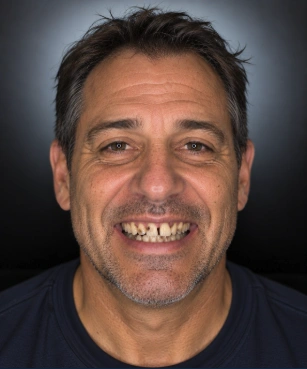 Before
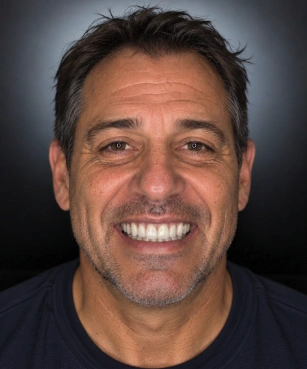 AI Smile Preview
1. Start with the patient and their photo
Create a patient case and upload a clear source photo with appropriate permission. Keep the source intact so the office can compare the generated result with the person it began with.
A good source has a visible smile and a natural expression. A photo cannot reveal hidden anatomy or establish treatment suitability; that requires clinical assessment.
2. Select treatment context and aesthetic preferences
Choose the relevant treatment, smile style, tooth shade and shape. These selections guide the after-image instructions; they do not diagnose or prescribe care.
Ask what the patient wants to retain as well as change. Review the result for tooth size, facial consistency and unintended changes. AI can produce imperfect or unsuitable previews.
3. Review before and after together
Compare original and generated images side by side. If a direction is not right, refine the choices and review another design. Completed designs remain associated with the patient case.
Select the preferred preview before creating a video. A preference records an aesthetic choice, not a clinically approved outcome.
4. Write what the talking video says
Where patient videos are enabled, choose a preset or Custom Practice Script (Write Your Own). The custom script accepts up to 120 characters and 20 words with validation for short, patient-friendly speech.
Generate and review the short video from the preferred after preview. The person’s voice, words and motion are simulated, never a real patient statement or testimonial. Exact delivery and flawless motion are not guaranteed.
5. Present and share intentionally
Open the patient presentation with before-and-after imagery and the available matching video. Download patient PDFs or original generated video when useful.
Email to Patient requires confirming the saved email before sending an private, revocable private presentation link. Public marketing use requires separate authorization.
What you are subscribing to
The Studio’s published offer is $199/month for unlimited smile designs without per-design credit packs. Patient talking videos are part of the Studio workflow when enabled by practice settings; the separate Social Media Ads & Creative feature has its own access and subscription.
Your 14-day free trial starts automatically once your card is verified. $0 today, then automatically $199/month after 14 days unless cancelled. A separate 30-day money-back guarantee applies after first billing. No contracts.
Illustrative AI visualization. Diagnosis, clinical planning and expected outcomes remain with your treating dental team.
Sign Up Now